cse15l-lab-reports
Lab 3: Streamlining ssh Configuration
ssh/config file
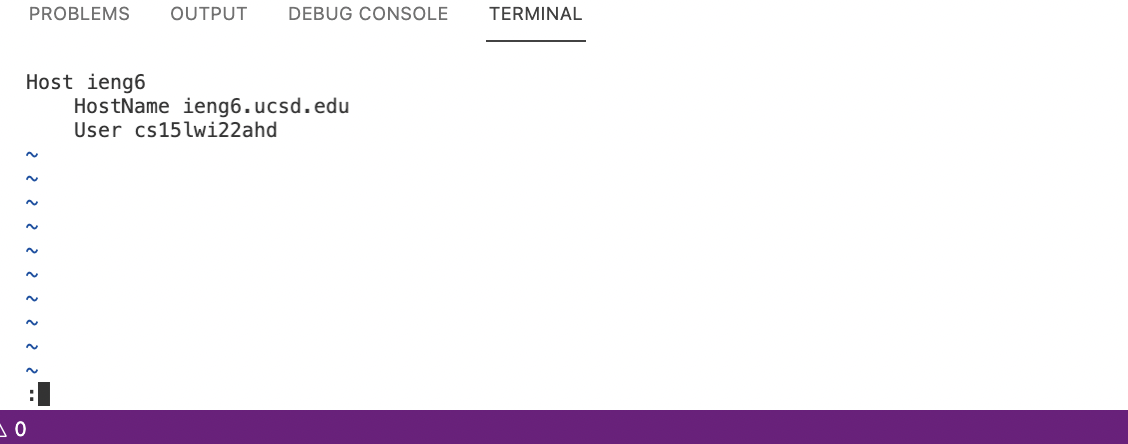 I Streamlined the ssh configuration. To create a config file, I entered the
 \.ssh directory on my local computer using cd \.ssh. I created the empty config file using the touch config command. Then used the vim config command to edit the file. I pressed the i key to allow insertions. I coppied and pasted the code from Lab report 5. Then changed the email to the correct course specific email. After that I exited the insert mode using esc. The pressed typed :wq.
ssh command being used
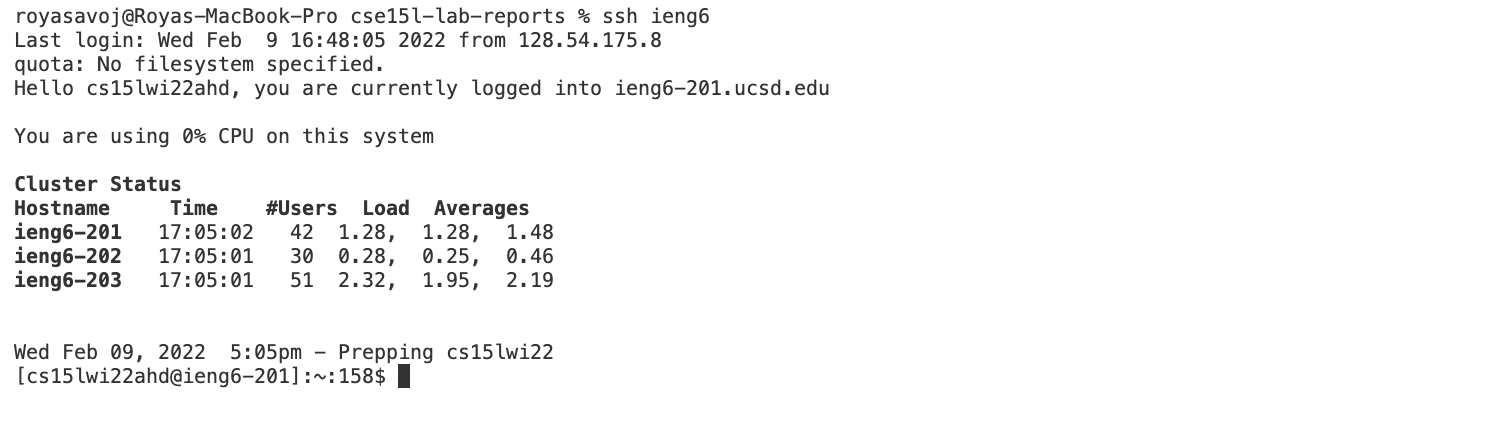 Instead of typing
 ssh cs15lwi22ahd@ieng6.ucsd.edu I can now type ssh ieng6. ieng6 is the host name that I chose in my config file.The number of keystrokes is reduced by 22 strokes.
scp command

The key can also be used to copy files to the ieng6 account. The command scp fileName ieng6:~\ can be used to copy files. This is much shorter than the command scp fileName cs15lwi22ahd@ieng6.ucsd.edu:~\ The Host key I chose reduces the number of keystrokes by 22 strokes.

This image shows the file added to the ieng6 account.